

There are a lot of smart home devices that I would describe as evil – proprietary, locked-down devices that you can barely be said to own. Smart TVs are the ones that most people interact with daily (Samsung’s TVs are particularly atrocious, despite being incredible on a hardware level), but other devices like fridges, smart speakers and smart hubs often top the list. The Apple HomePod and HomePod mini are somehow the least evil devices in this category, mostly unassuming with rock solid sound that do what they’re told, which gives you a sense of how cursed this genre of hardware can be.
Basically every device that Amazon in particular produces is in some way evil, from Kindles to Fire Tablets. Amazon has set billions of dollars on fire trying to dominate the smart speaker and smart display market, having bent over backwards to get their Echo line in people’s homes under the assumption that they will use it for more than playing Spotify, displaying recipes, or setting a timer (spoiler, they will not).
Then came the ads. At the end of last year Amazon’s Echo Show line, a smart display that’s basically a bluetooth speaker stapled to an Android tablet, started showing full-screen ads to users when it previously had not. When confronted about this by my former colleague from The Verge Jennifer Tuohy, Amazon’s Panos Panay justified the decision, saying that if they’re relevant to the consumer they are not ads but “an add-on.” This is an absurd and frankly insulting justification for what can only be seen as a bait and switch by an underperforming division within Amazon. Customers who bought these devices and used them for several years were not used to them showing full screen ads, and now they do. People were justifiably pissed. So what do you do when an already evil device gets shittier?
The real tragedy here is that the hardware that underpins the Echo Show line isn’t bad. The speakers are perfectly acceptable, the form factor is useful, and if you want something simple to look at recipes on that plays music you could do far worse. A computer is not inherently evil when it’s made; it becomes evil by whatever it is made to do – leak your data, surveil you, expose your home to a security risk, or start displaying ads after you’ve already paid for it. Amazon has historically done this by running a particularly locked down and annoying version of Android on their devices called Fire OS (and, moving forward, a similarly neutered version of Linux called Vega OS) that won’t let you have any fun. But it doesn’t have to be that way, and in a weird coincidence a few developers found a way, for now, to turn a few of these increasingly mediocre Amazon Show devices into friendly, useful, open computers.
Last year, users on the XDA Devs Forum, the premiere destination for Android development generally and for modding anything even remotely Android-based specifically, found exploits for three specific Amazon smart displays: The Echo Show 5 1st Gen (codename Checkers), Echo Show 5 2nd Gen (codename Chronos), and Echo Show 8 1st gen (codename Crown). The exploits allow for the user to either sideload custom APKs within FireOS or, even better, install an entirely different version of Android altogether – a port of LineageOS that lets you do whatever you want with the device. These specific models are quite old, from 2019, and have a very limited amount of space to work with. Later models may never be cracked, as they run different hardware and OSes, this hack is still experimental and Amazon could also potentially patch the exploit at any moment. The hack risks bricking the device. But if you follow the instructions you could have an open, jailbroken smart display that does exactly what it’s told.
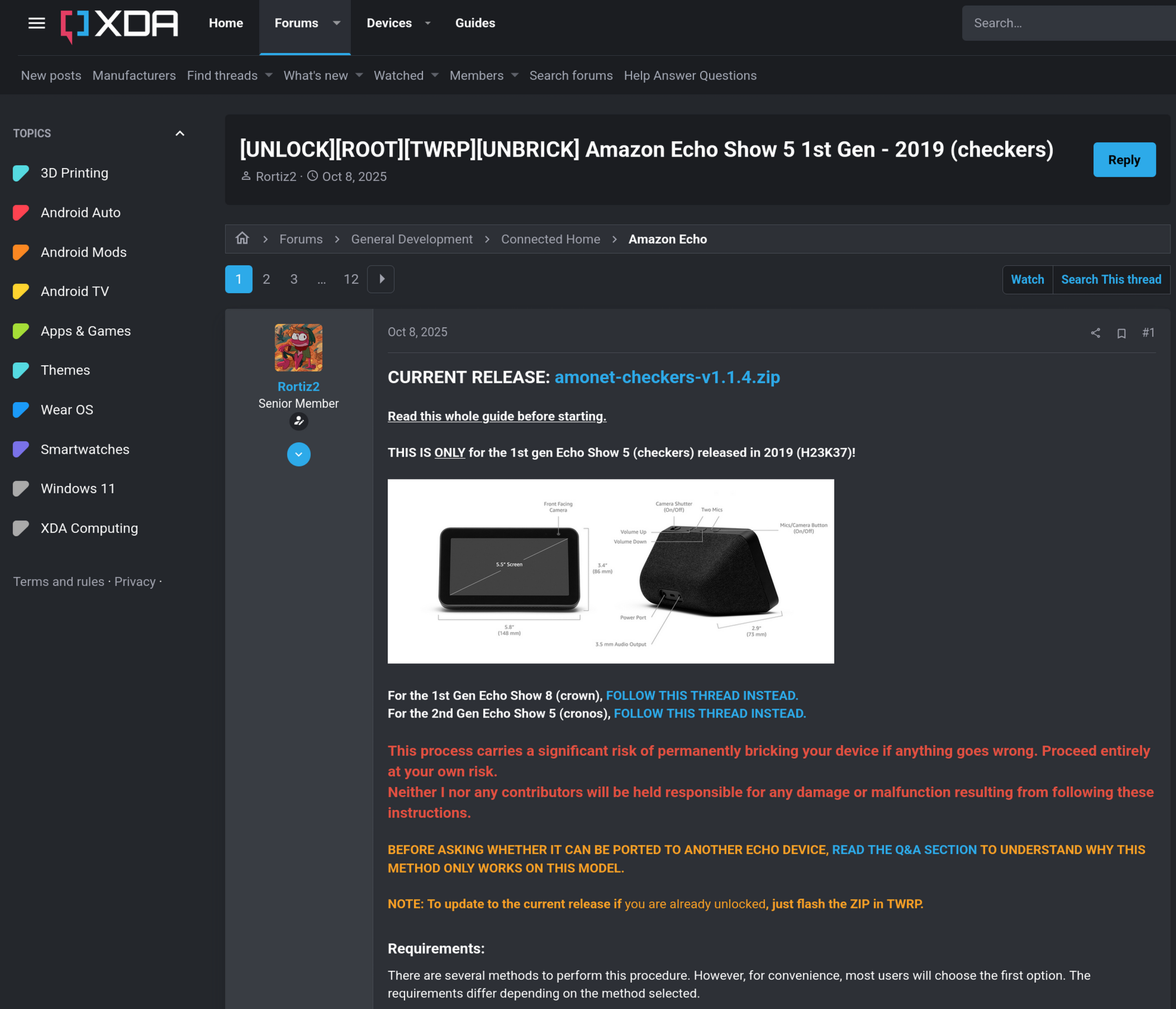
A brief oral history of the hack, from the people who pulled it off
User Rortiz2 had been jailbreaking Amazon devices on the boards for a while, starting with Fire tablets and moving on to Fire TV devices. "The common thing about all [the devices I’d hacked] is that they use MediaTek SoCs, and that's kind of what makes unlocking them possible," Rortiz2 told me via Telegram.
"They're usually divided into two parts (it's basically a two-stage exploit chain): the bootrom / preloader part (used to flash things to the device) and the bootloader part (which makes the unlock persistent)." The exploits are called kamakiri and amonet, and Amazon patches these exploits over time depending on the device.
Rortiz2 was aware of the Echo line, but they were not sold in his country of Spain. Eventually the main developer of the LineageOS port the Echo Show uses, bengris32, jokingly asked Rortiz2 if he could hack an Echo Spot 1st Gen, an alarm clock in the same line. Rortiz2 caved and bought one from eBay to test out, probed the motherboard, forced bootrom mode, dumped the firmware and adapted existing tablet exploits to the task. "From there we started working on it together. I focused mostly on the exploit / unlocking side of things, while he handled most of the LineageOS development."
Eventually people asked if the same kind of exploit was possible with the Echo Show 5 smart display, and Rortiz2 relented, purchasing a sealed Gen 1 model. Though he was able to dump the firmware, he ran into issues with both stages of the exploit being patched by Amazon.
The breakthrough came in two parts. The first was a person reaching out that they had a demo version of the Echo Show 1 with vulnerable firmware. Guided by Rortiz2, the person dumped the firmware on this early version of the device for them, allowing an exploit to be ported, which let the bootloader, dubbed "LK" for Little Kernel, to be unlocked. The second part came from user k4y0z, who had been working on a private exploit for Fire tablets running in fastboot mode. "It's basically a buffer overflow that gives you arbitrary code execution after issuing a single fastboot command," Rortiz2 told me. "I spent months porting and adapting it to the Echo Show, and eventually managed to create what people are using now, amonet fastbrick, which is basically a one click bootloader unlock."
"It might sound easy, but I can assure you the amount of hacks I had to resort to was insane."
Eventually they would repeat the process with 1st gen Echo Show 8, but they did not have a demo version of the device to work from. Randomly, Rortiz2 suggested flashing the firmware for the Echo Show 5 to the 8, which shockingly worked but without a working display as the two devices did not share display drivers. Still, it was a chink in the armor that he was able to turn into an exploit of its own. "I hacked together a way to chainload the bootloaders. It’s pretty crazy, but it works."
Good channel! Solid tutorial expressed in digestible terms! Nice work Jeff.
Doing it myself
If you want a good summary of what the finished jailbreak looks like in practice, I would highly recommend Dammit Jeff’s tutorial above. Jeff is a creator ideologically similar to myself and has a channel that is a good, digestible resource for hacking devices like Kindles and Fire Tablet. The instructions are fairly comprehensive, and totally doable for a lot of people.
I started by getting a used Echo Show 8 1st Gen off of eBay for about $50, making sure to confirm that the compatible model number (C7H6N3) matched the unit in the thread. When I got the device, I made sure it was up to the most recent firmware, which unfortunately does involve registering the device with Amazon before cleansing it of evil. I dug through my closet to find a Micro USB cable and installed the Google drivers needed to load the jailbreak. I connected the device via USB, holding down all three buttons at the top to put it into “fastboot” mode. From there I loaded the amonet-fastbrick package via a terminal window. This is the part of the process where you are most likely to brick your device, so if you do this be patient.
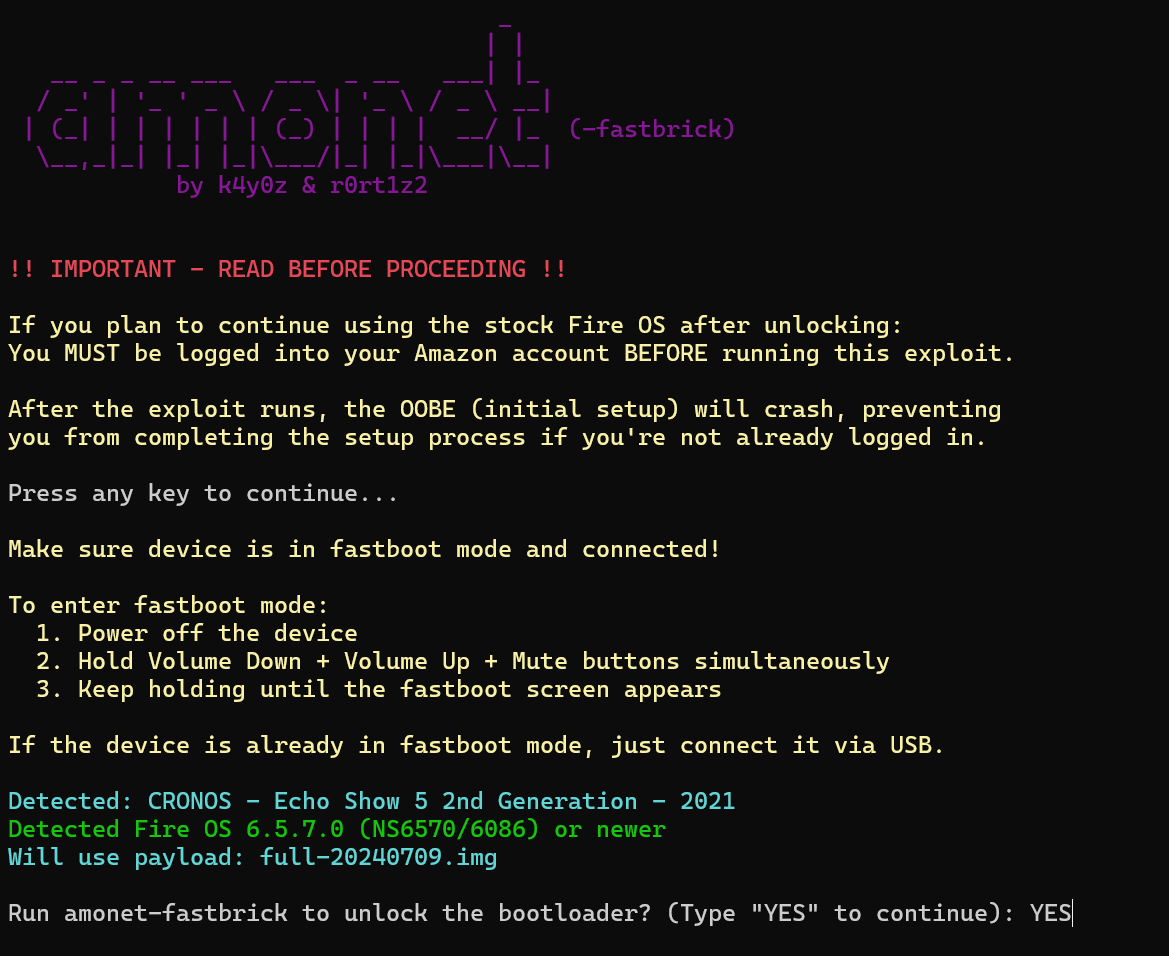
The screen filled up with the soothing sight of ASCII art, and when it rebooted the device loaded up TWRP (the Team Win Recovery Project), a long running project from the XDA forums and the recovery software used to load LineageOS on the device. From there I wiped Fire OS from the device and used ADB sideload to directly load two packages on the device: LineageOS and MindTheGapps. MindTheGapps lets you turn the device into something resembling a traditional Android device, for both good and bad. If there’s anything you need to install from the official store that is not covered by alternatives like F-Droid, this is something you generally want to do, but I may end up doing it over without it as degoogling my life as much as possible is also something I want. In subsequent installs, I didn’t even bother.
When I rebooted the device, it worked! Sort of. The device only has 8 gigs of on-board flash storage and 1 usable gig of RAM. For some reason parts of the older partition were not fully removed, causing it to run sluggishly. It took a few times of wiping the device, but after a few tries it finally worked as intended. I was free of the horrible stock Fire OS and now had a generic Android tablet glued to a bassy party speaker. I immediately installed the Home Assistant app, allowing me to turn the device into a kiosk for controlling my existing HA instance. I also installed two other pieces of software: Obtanium and the Sendspin Droid app.
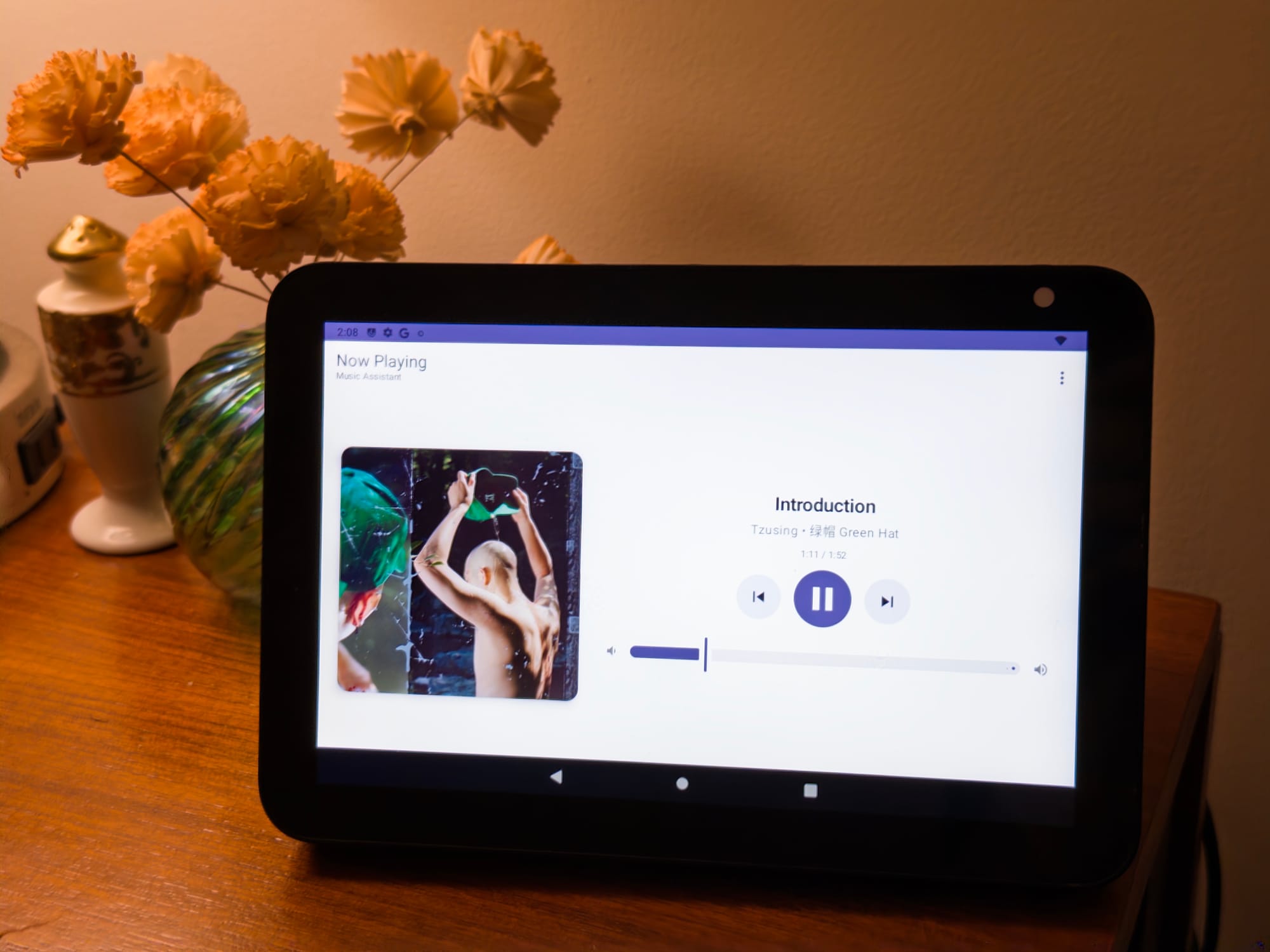
Obtanium lets you download packages directly from the source, and also informs you when they have been updated. Sendspin is an open source multi-room audio protocol for Music Assistant, the in-development home music solution from the creators of Home Assistant. Music Assistant seeks to unify different music services and devices the way Home Assistant did — allowing you to connect any endpoint (AirPlay, HeOS, Sonos, UPnP/DNLA, Squeezelite, etc.) to any many existing services (Apple Music, Spotify, or even just locally served files from a drive).
Another one.
— Chris Person (@papapishu.bsky.social) 2026-03-07T21:26:07.567Z
I now own four of these things.
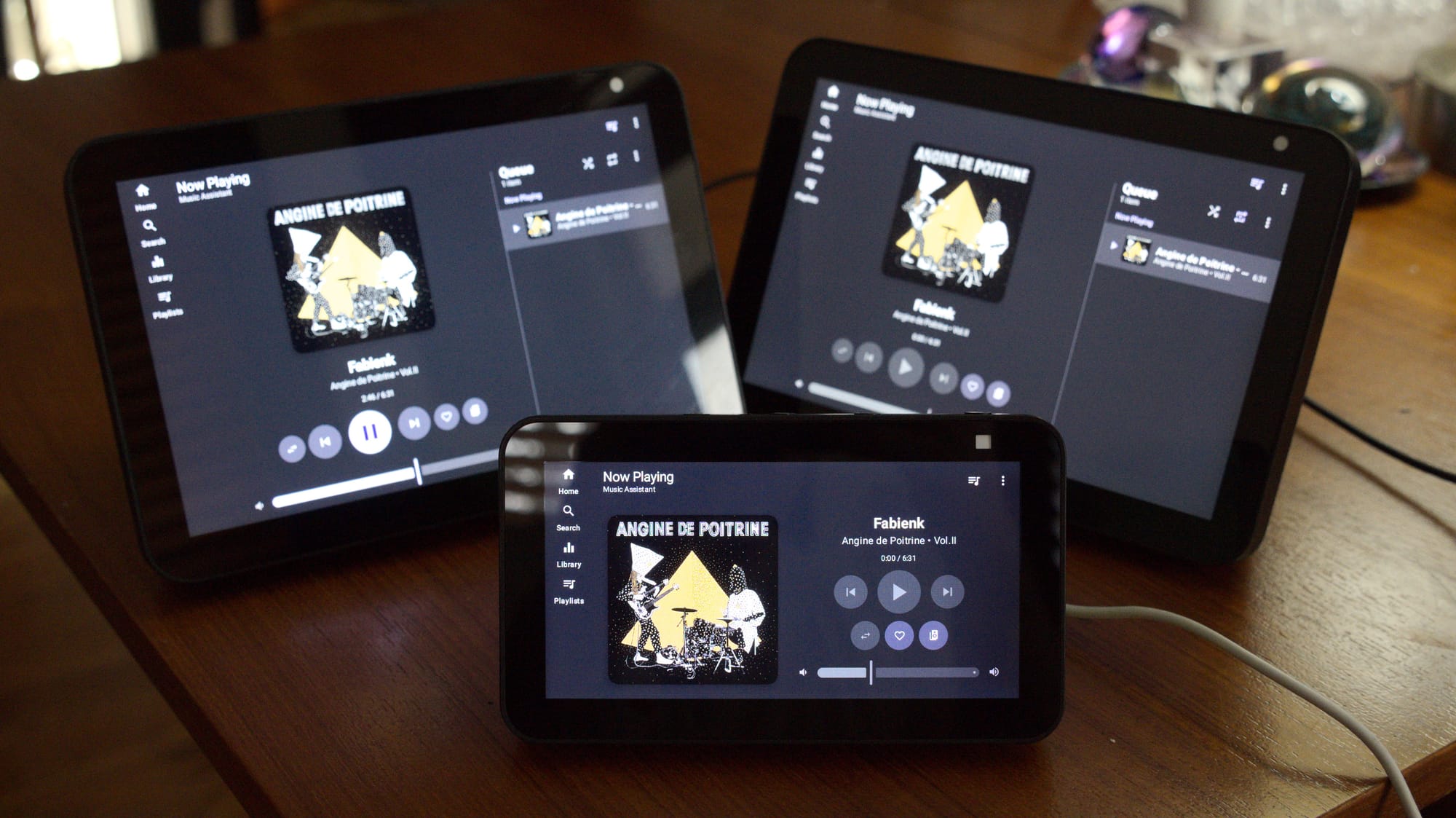
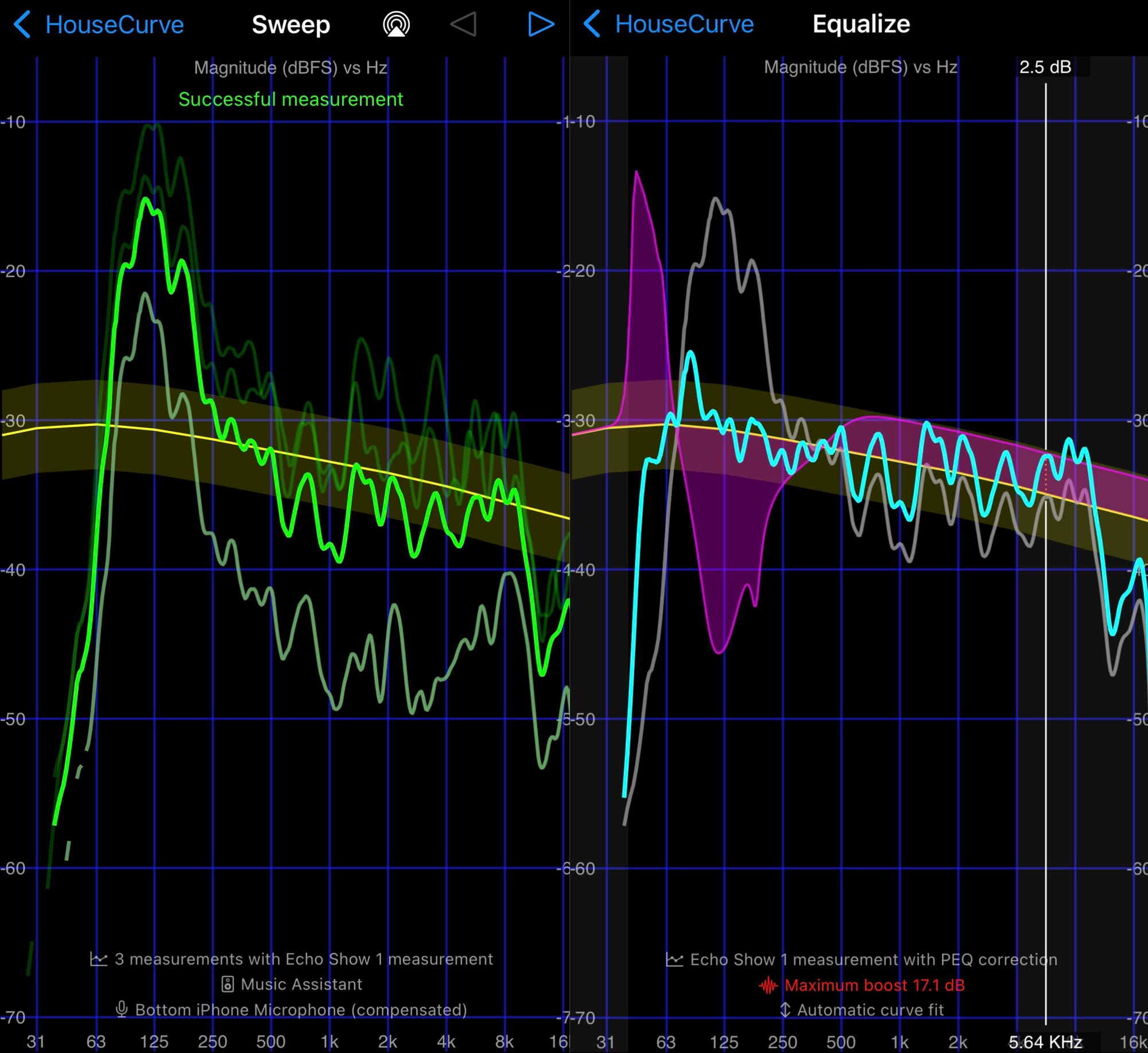
Not only can the hacked Echo Show 8 control my entire smart home, it now plays back my entire local music library as well as any internet radio channels like The Lot Radio and NTS. It can also synchronize with any additional Echo Show running LineageOS in my house using the SendSpin protocol. SendSpin also allows you to output audio with a per source DSP like a 10 band parametric equalizer. I was able to use HouseCurve, a speaker correction app for iOS and an AirPlay 2 endpoint in Music Assistant to measure the output of the Show using pink noise sweeps. With the output generated, I could EQ its overly bassy response into something more respectable.
Fine but free
The first gen Echo Show 8 is a little slow, it doesn’t have a lot of RAM or storage, but the old girl has enough life left in her to do exactly what I want. I would gladly take it any day of the week over most of the devices these companies offer, especially Amazon. It may not be as intuitive as out-of-the-box smart home products, but I don’t need my devices to be intuitive, I need them to behave. I had finally found a smart display that wasn’t a cop. So naturally, I immediately bought two more.
The next two I bought from Goodwill were a mixed bag. The first was the smaller Echo Show 5 in a Kid’s edition, a device with a smaller screen and a sporty fluorescent reptile texture on the body. I had to factory reset it to update the firmware because people never wipe their stuff before handing away their devices, but apparently Kid’s edition features a OS level child safety feature, so now Amazon thinks I have a 23 year old son named Fake Person who exists as a technical fiction. The display was also slightly dim on the right side, but under dark mode that was not noticeable.
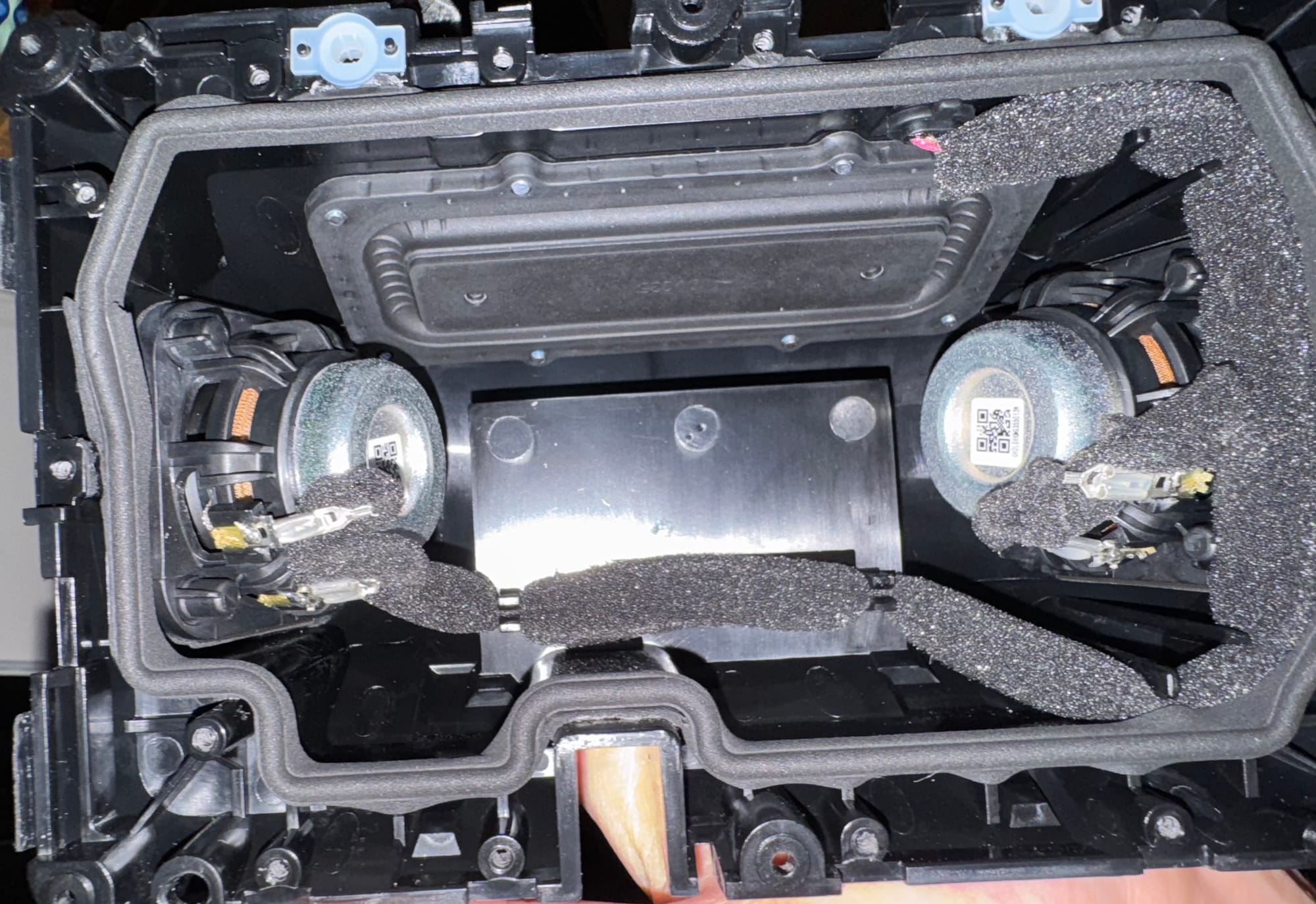
The install on the third Show (another Echo Show 8) went off without a hitch, but unfortunately the left driver was blown out. This is just a function of the Goodwill lottery, but it did give me a chance to disassemble the entire thing and see how it was constructed. The inside of the Show 8 Gen 1 is a mess of ribbon cables, adhesive, and a specific torx screw that nobody except huge dorks have the driver for. I could not fix the speaker, but it still has an aux out and functions, so I know how to frankenstein these things together easily now. I have started impulsively buying these things whenever I see them, like a Trap-Neuter-Return program for cursed devices, at least until Amazon crashes the party and patches the exploit.
No Alternatives
The funny thing about the hacked Echo Show 8 is that there’s no competition for what it exactly does at that price point. I don’t need or want a voice assistant because I’ve never enjoyed using them, although I could probably install one on the hacked Show if I wanted to. The hardware is old and creaky, and after the hack it can only use 1GB of the 2GB of ram. And yet it still manages to feel snappier than the stock hardware. “The amount of telemetry, ads, and general bloat Amazon shoves down our throats definitely doesn't help performance,” Rortiz2 told me. “That's actually another reason why we did LineageOS, it kind of gives the device a second life. Even though it's still a bit buggy, it feels way better to use than the stock firmware.”
Both Apple and Google have been sluggish on their smart display offerings, with both the HomePods and Nest Home having lagged behind Amazon. Apple has allegedly been working on a smart screen that was supposed to be out in 2025 but was delayed because Siri development has been notoriously bumpy. Google did attempt to bridge the gap with the Pixel Tablet, an Android tablet with an optional speaker dock, but that’s orders of magnitude pricier than its competition and far more than the 20-50 bucks I paid for my used Shows. What’s more, over the past year Google announced, and then went back and forth on, the ability to sideload apps in Android, introducing a new process that would require developers to verify apps even when sideloading. There’s tons of reason to be wary of Google; the future is not that way.
If you want a smart speaker with a display that just runs a stripped-down version of Android that you have full control over, you’re going to have a hard time finding it outside of these three specific models unless you cobble something together yourself. It is a deceptively simple thing to desire — the kiosk computer from science fiction that isn’t a narc — yet few companies really offer it.
But why? Why is it so hard to just get a tiny little computer that respects me? Why have we allowed ourselves to be walled in like this on smart home devices? Why do we allow companies like Samsung and Amazon to fill the devices we own with ads, to be trapped with condescending playpen operating systems like Tizen and Fire OS? If I want a smart home hub that isn’t evil, why must I perform an exorcism?
“Overall I feel like these IoT devices could have a lot more potential if people were allowed to freely mess with them and experiment,” Rortiz2 told me. “That would let the community do interesting things with hardware that would otherwise just end up as e-waste.”
It should be against the law to not give an end user the ability to consensually load whatever OS or program they want on their device. I own my computer; I’m not simply borrowing it from a graceful, rich patron. The primary purpose of a computer is to do exactly what it’s told. If we budge on the inalienable right to modify our hardware then we forsake a key part about what makes computers special. There are so many devices that could be put to use rotting in e-waste facilities and thrift stores – I know because I regularly frequent both like a bloodhound. We must never stop hacking, jailbreaking, modding and liberating these devices. Even the term “jailbreak” contains within it a fundamental truth: that to live any other way is computational prison.


